> What’s New ? <
blog-furs
Starting Forth
I started using Mecrisp-Stellaris Forth in 2018 with my STM32F051 embedded projects because the Forth interactive REPL made possible a massive reduction in development time compared to either Assembly or C.
Up until then, as a electronics equipment designer, I had built and sold equipment of my own designs to solve customer problems since 1975, so I had already accrued a lot of embedded experience.
I had used, and was very familiar with a number of 8 bit processors, but with Forth I started using the very modern STM32F051, which is a Cortex-M0 and features around 37 inbuilt peripherals, 413 registers and 3044 fields. All these inbuilt peripherals provided facilities that I once had to add by hand, but now were built-in, and for very little cost.
Truly, the Golden Age of Microprocessors had arrived.
Forths Big Problem
However there was a MAJOR showstopper for me, namely Mecrisp-Stellaris Forth didn’t know anything about the inbuilt peripherals!
Perhaps this was a major problem only for me because I’m not a 100 WPM typist, in fact I’m a two finger typist because when I went to school back in the early 70’s, only girls learned to type, and they used mechanical typewriters to do it.
Besides, a large program might use a number of peripherals and hundreds of fields, so typing them into the source myself was very error prone and time consuming. I would have the Technical Reference (1000 pages) open on my pc and just copy the data by hand as a constant in the form of something like this which is reasonably decent, readable, maintainable, traceable source code as it’s CMSIS compliant.
$48000000 constant GPIOA_MODER
GPIOA_MODER $16 + constant GPIOA_MODER_MODER8

\ set pin PA8 for output
01 16 lshift GPIOA_MODER_MODER8 !
But this method was incredibly slow, tedious and highly error prone for me. I spent about 50% of my time debugging typos or just incorrect information. Frankly it was totally unusable for me in embedded work.
And Forth can’t know all about the peripherals because in a Cortex-M0 there simply isn’t the flash memory (max 64KB) for all that information. It would need to be in the mcu because that’s where the real-time compiler is so you can have the interactive REPL.
Note
I didn’t (re)set the MODER bits to 00 first, as they are that way after a reset by default.
The C programming Language Has “Headers” To Provide The Peripheral Information
This problem doesn’t exist for the C programming language because the C manufacturer supplies “header files” for every model they support, ready for use by programmers who can search the API to find what they want for their source. Example C code looks like this:
// Include the appropriate header for your specific STM32 device (e.g., stm32f4xx.h)
#include "stm32f4xx.h"

// Set for output (01):
// GPIOA->MODER |= (0b01 << (0 * 2));
Now C can do this because everything is compiled on your pc, only the final binary is downloaded to the mcu. This means that there is no interactive REPL like Forth, so if your C program doesn’t work, you need to either use a debugger like GDB or figure out why using your brain.
I Start Working On A Solution
Around this time Matthias Koch (the Designer of all things Mecrisp*) told me about work by Ralph Doering at https://github.com/ralfdoering/cmsis-svd-fth that “Creates FORTH code for register definitions of ARM Cortex-M devices based on its CMSIS SVD XML description”.
I soon learned XML and XSLT, Shell and all the utilities I needed to start developing something that would generate lists of useful constants for my STM32F051 mcu using Ralphs methods. By 2015 I had developed a solution I named “registergenerator”. Over the following years, I developed improved versions :
2016 mecrisp-registergenerator
2017 svd2forth-v1
2018 svd2forth-v2
2019 svd2forth-v3
These were all improved versions of the same kind of app, namely it produced a list of Mecrisp-Stellaris Forth words ready to use to program the mcu peripherals in a program. They all used the mcu SVD file.
In 2017 I made “svd2gas” which generated a list of EQU statements for any Cortex-M with a SVD file, ready to use in an assembly project.
At some point I added the ability to generate configurable tables of real-time data and included this facility with “svd2forth”. Here is a sample from the RCC register:
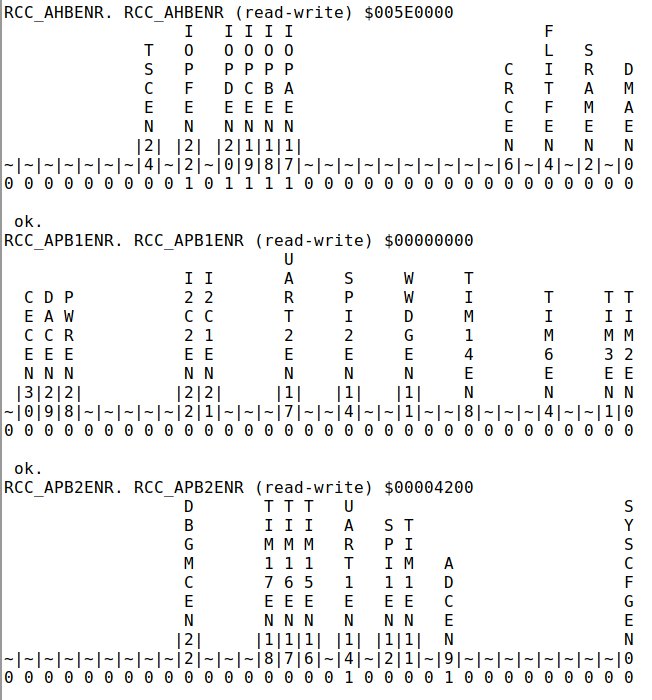
Unfortunately this kind of facility uses a lot of flash memory, so only a few targeted peripheral registers in a project could be uploaded to the dictionary. It is very useful but limited, however when used with the SWDCOM terminal, it’s instant and doesn’t interfere with program operation if it prints less than 255 characters.
In 2021 I put this facility to good use in the ‘Bluepill Diagnostics-v1.6’ which Hackaday did an article on at https://hackaday.com/blog/?s=bluepill+diagnostics. It’s been downloaded well over 10,000 times to almost every country in the world. So if you have used this on a Blue-Pill board you own, you can test this out, just look in the dictionary for register words. My project URL is https://mecrisp-stellaris-folkdoc.sourceforge.io/bluepill-diagnostics-v1.6.html
I developed “svd2db” in 2022. It makes SVD Files easily searchable via a Sqlite database, and also includes the absolute address of all registers. Hackaday did a short article on it at https://hackaday.com/blog/?s=svd2
Then the ever-creative Rust people made a SVD for the TI MSP430 and the Ti TM4C1294 mcu’s so I distributed svd2forth’s for those as well. Along the way I made releases of svd2forth for the msp430, esp32, rp2040 (very limited with no description fields as they read like ‘War and Peace’!), py32f030 and quite a few other non STM32 mcu’s.
By 2023 I felt that “svd2forth” had gone about as far as I could take it and I was beginning to look for a better way to incorporate all the peripheral information in a Cortex-M0 project, without needing to store it in the limited mcu flash.
FURS Takes Form
In 2023 I came up with the FURS concept, tho initially it was named “PLANG” for “Peripheral LANGuage”, but it took me another two years before I had the time to finish the beta release. At this point I wanted a method that integrated the FURS DCVS with documentation and so I released it as a Fossil DVCS repository “furs.fossil” which is freely available for download at: https://sourceforge.net/projects/mecrisp-stellaris-folkdoc/files/furs.fossil/download
furs.fossil is a single file, about 25 MB with the bulk being included PDF’s for the example project components.
Digital Thermometer Project
This the FURS example project. It is a digital thermometer using a STM32F0 Discovery board and a TI LMT01 digital thermometer chip that works using the FURS generated upload code.
The FURS Fossil REPO
I chose Fossil as the distribution medium because it’s a complete distributed Code Versioning System, not just a DVCS. Fossil is made for distributed teams to design projects and it includes all the collaborative applications that GIT users have to install separately.
Fossil includes the following, all in one FLOSS binary executable, available freely for Windows, Mac, Linux and FreeBSD:
Web server
Forum
Trouble Ticket Server
Wiki
Chat Server
DCVS
Graphical Flowcharter (The flowcharts in the FURS Intro were made by Fossil)
And everything including the flowcharts, pictures and wiki-docs can be viewed in any web-browser thanks to the handy Fossil built in webserver.