FURS INTRO
No more tedious, slow and error-prone manual searching in PDF technical manuals for a peripheral register name and adddress before pasting them in your source code as constants.
Just use the included CLI API Search Application (which is CMSIS compliant) and search for the name only.
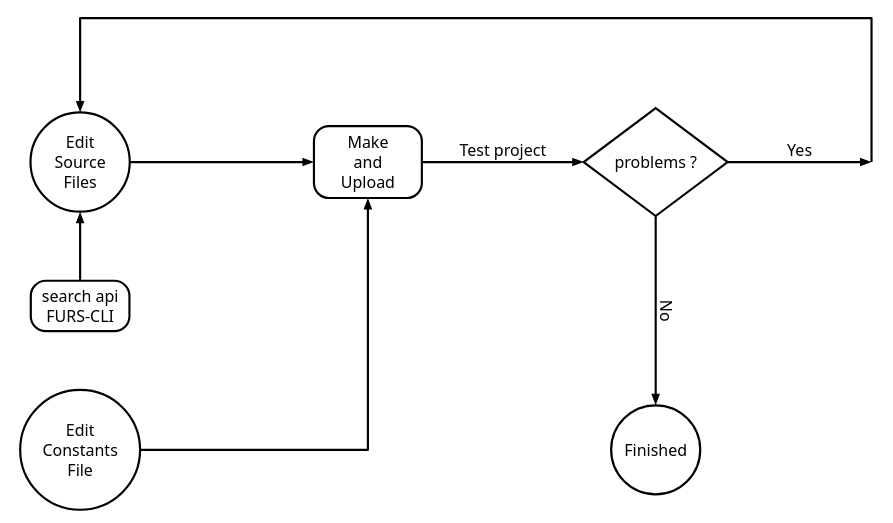
Using FURS During Project Development
STM32F051 Sample Forth project Source
: gpio-init ( -- )
\ Enable GPIOA and GPIOC
RCC_AHBENR_IOPAEN enable! \ enable GPIOA
RCC_AHBENR_IOPCEN enable! \ enable GPIOC
;
STM32F051 FURS Uploaded Code
: gpio-init
$40021014  17  enable!
$40021014  19  enable!
;
How Does FURS Work ?
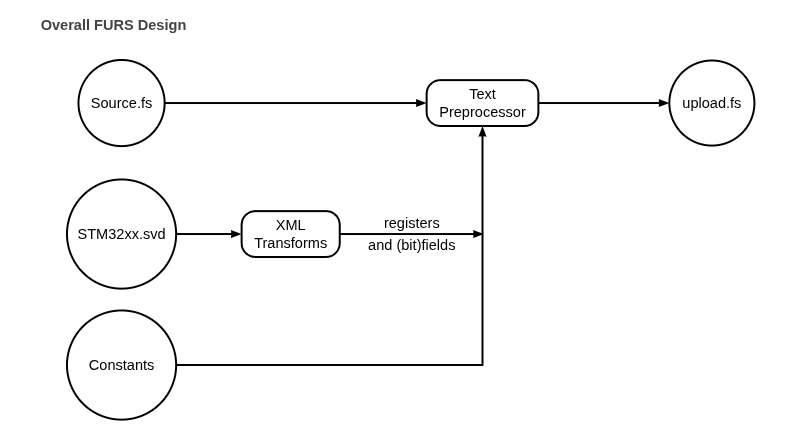
All field names in the Forth Source are swapped for their absolute address in the upload code for the mcu.
FURS removes all comments, spaces and blank lines from the upload code so that the upload process is as fast as possible, avoiding unnecessary delays.
Your source is untouched, the mcu receives the language it wants while you use syntax that humans prefer.
And this is all automatic, all you need is the SVD file for the STM32 mcu that you’re using and either Linux or FreeBSD and possibly OSX (untested).
Furthermore FURS saves mcu memory because no constants are needed to be saved in flash! All the processing is done on your PC which frees up the very limited flash memory of Cortex-M0 mcu’s for actual program code.
Getting FURS
FURS is OpenSource and free to download, this is how you do it.
Download “furs.fossil” from https://sourceforge.net/projects/mecrisp-stellaris-folkdoc/files/furs.fossil/download